

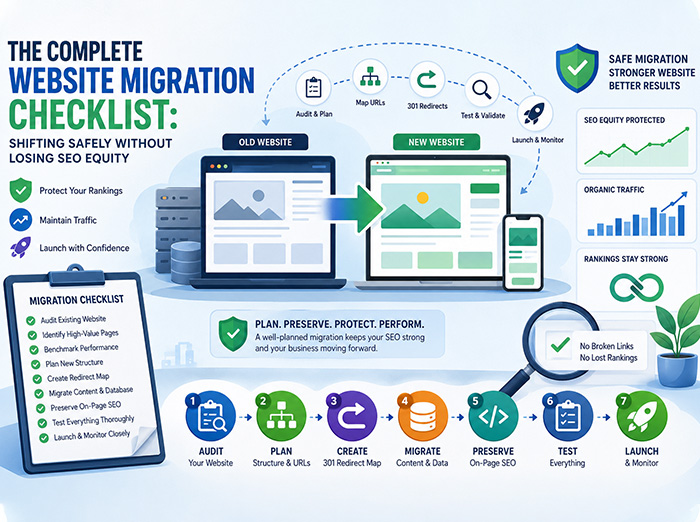







The Complete Website Migration Checklist: Shifting Safely Without Losing SEO Equity
A website migration is one of the most significant technical changes a business can undertake. Whether you’re moving from a legacy PHP application to Laravel, migrating an online store to Shopify, redesigning your corporate website, or consolidating multiple domains, the migration process affects much more than design and functionality.
Done correctly, a migration can improve website performance, user experience, security, and scalability. Done poorly, it can lead to broken pages, lost rankings, declining organic traffic, and reduced revenue.
Many businesses focus heavily on the new website while overlooking the technical details required to preserve years of accumulated SEO value. Search engines have already indexed your content, associated authority with your URLs, and built trust in your domain over time. A migration that ignores these factors risks undoing years of digital marketing effort.
The good news is that these issues are preventable with proper planning. This guide provides a comprehensive website migration checklist to help you transition safely while protecting your search visibility and delivering a seamless experience for users.
Why Website Migrations Are Risky
A website migration affects nearly every aspect of your digital presence. Search engines must rediscover pages, process redirects, evaluate new site structures, and understand how your content has changed.
Even small oversights can have significant consequences. Common problems include:
- Broken internal links
- Missing pages
- Incorrect redirects
- Duplicate content
- Slow page speeds
- Lost metadata
- Crawl errors
- Reduced keyword rankings
The objective of a successful migration is not simply to launch a new website—it is to maintain or improve your existing performance.
When Should You Migrate?
Businesses typically migrate their websites for several reasons, including:
- Upgrading from legacy PHP to Laravel
- Moving from custom-built platforms to Shopify or WooCommerce
- Redesigning outdated websites
- Consolidating multiple domains
- Improving website performance
- Implementing better security
- Supporting business growth with scalable infrastructure
- Modernizing user experience
Regardless of the reason, every migration should begin with a structured plan.
Phase 1: Audit Your Existing Website
Before making any changes, understand exactly what you have today.
Think of your current website as a blueprint. You cannot rebuild it effectively without documenting its existing structure.
Create a complete inventory of:
- All URLs
- Landing pages
- Product pages
- Blog posts
- Images
- PDFs
- Videos
- Internal links
- Navigation structure
- Metadata
- Schema markup
This inventory becomes your migration roadmap.
Identify High-Value Pages
Not every page contributes equally to your business.
Prioritize pages that generate:
- Organic traffic
- Sales
- Leads
- Backlinks
- Brand authority
Use analytics and search performance tools to identify your highest-performing pages before migration.
These pages deserve special attention throughout the process.
Benchmark Current Performance
You cannot measure migration success without baseline data.
Record key metrics such as:
- Organic traffic
- Keyword rankings
- Conversion rates
- Page speed
- Core Web Vitals
- Indexed pages
- Bounce rate
- Average session duration
After launch, compare these metrics to identify issues quickly.
Phase 2: Plan Your New Website Structure
Website migrations provide an excellent opportunity to improve information architecture.
However, unnecessary URL changes should be avoided.
Search engines associate authority with URLs.
Changing them without proper redirects wastes accumulated SEO value.
Preserve URL Structures Whenever Possible
If an existing URL performs well, keep it.
Example:
Old:
example.com/services/shopify-development
New:
example.com/services/shopify-development
No redirect required.
Simple.
Effective.
When URL Changes Are Necessary
Sometimes restructuring cannot be avoided.
For example:
Old:
/products/category1/item1
New:
/shop/item1
This requires a permanent 301 redirect.
Every old URL should point directly to its most relevant new destination.
Never redirect everything to the homepage.
Phase 3: Build a Complete Redirect Map
A redirect map is one of the most critical documents during migration.
It connects every existing URL to its corresponding new location.
Example:
| Old URL | New URL |
| /about-us | /about |
| /contact.php | /contact |
| /services/web-design | /web-design-services |
Each redirect should use:
301 Permanent Redirect
This tells search engines that page authority should transfer to the new URL.
Avoid Redirect Chains
Redirects should always follow the shortest path.
Bad:
Page A → Page B → Page C
Good:
Page A → Page C
Chains slow websites and dilute SEO value.
Phase 4: Database Migration and Content Mapping
Platform migrations often involve transferring thousands of records.
For ecommerce websites, this may include:
- Products
- Categories
- Customers
- Orders
- Reviews
- Coupons
- Inventory
- Blog content
Each field should be mapped carefully before migration begins.
A single mismatch can cause missing products, incorrect pricing, or broken customer data.
Validate Data Accuracy
After migration:
Verify:
- Product descriptions
- Pricing
- Images
- Categories
- User accounts
- Order history
- Search functionality
Data integrity should never be assumed.
Phase 5: Preserve On-Page SEO
Many migrations unintentionally erase years of optimization.
Ensure every page retains:
- Page titles
- Meta descriptions
- Header tags
- Image ALT attributes
- Canonical tags
- Structured data
- Internal linking
Missing metadata often leads to immediate ranking declines.
Don’t Forget Schema Markup
Structured data helps search engines understand your content.
Depending on your website, preserve schema for:
- Organization
- Products
- Reviews
- FAQs
- Breadcrumbs
- Articles
- Local Business
Removing schema unnecessarily reduces search visibility.
Phase 6: Optimize Performance Before Launch
Launching a beautiful website that loads slowly defeats the purpose of migration.
Performance directly influences:
- SEO
- User experience
- Conversion rates
- Bounce rate
Before launch, optimize:
Images
Compress images without sacrificing quality.
Use modern formats like WebP where supported.
JavaScript
Remove unused scripts.
Minimize render-blocking resources.
Load third-party tools only when necessary.
CSS
Combine and minify stylesheets.
Remove unused code.
Caching
Implement browser caching.
Configure server-side caching.
Use Content Delivery Networks (CDNs) where appropriate.
Phase 7: Test Everything Before Going Live
Never launch without comprehensive testing.
Create a staging environment that mirrors production.
Test:
- Navigation
- Forms
- Checkout
- User login
- Search
- Payment gateways
- Contact forms
- Mobile responsiveness
- Browser compatibility
- Internal links
- Redirects
- Images
- Downloads
Every feature should function exactly as expected before launch.
Conduct SEO Testing
Technical SEO checks should include:
- XML sitemap generation
- txt validation
- Canonical tags
- Structured data validation
- Crawl testing
- Broken link detection
- Indexability
- HTTPS verification
Small SEO errors can have significant long-term effects.
Phase 8: Launch Carefully
Website launches should follow a planned process rather than a single “publish” button.
Recommended launch steps include:
- Schedule deployment during low-traffic periods.
- Back up the existing website.
- Enable redirects.
- Publish the new sitemap.
- Verify SSL certificates.
- Confirm analytics tracking.
- Test key conversion paths immediately after launch.
Preparation minimizes downtime and customer disruption.
Phase 9: Monitor After Launch
The work doesn’t end once the new website is live.
Monitor your website daily during the first few weeks.
Watch for:
- Crawl errors
- 404 pages
- Indexing issues
- Keyword fluctuations
- Organic traffic trends
- Conversion rates
- Checkout abandonment
- Page speed
Address issues promptly to minimize their impact.
Common Website Migration Mistakes
Even experienced teams can encounter avoidable issues during migrations. Some of the most common mistakes include:
- Forgetting to implement 301 redirects
- Blocking search engines with incorrect robots.txt settings
- Launching without testing
- Changing URL structures unnecessarily
- Losing metadata during content migration
- Ignoring internal links
- Publishing duplicate content
- Neglecting mobile optimization
- Removing structured data
- Failing to monitor post-launch performance
Avoiding these mistakes can significantly improve migration outcomes.
Platform-Specific Migration Considerations
Different platforms present unique migration challenges.
Migrating to Shopify
When moving to Shopify, ensure product data, collections, customer accounts, and redirects are transferred accurately. Review app compatibility and optimize the checkout experience after launch.
Migrating to WooCommerce
WooCommerce migrations require careful handling of WordPress configurations, plugin compatibility, media files, and database synchronization.
Migrating from Legacy PHP to Laravel
A Laravel migration offers opportunities to modernize architecture, improve security, enhance performance, and create a scalable foundation. Preserve routing logic, validate APIs, and thoroughly test business workflows.
Why Performance and UX Matter After Migration
Migration isn’t just about preserving SEO—it’s also an opportunity to improve the user experience.
A faster, more intuitive website can lead to:
- Higher engagement
- Lower bounce rates
- Better Core Web Vitals
- Increased conversions
- Improved customer satisfaction
Use the migration as a chance to streamline navigation, simplify forms, optimize mobile usability, and enhance overall performance.
Why Businesses Choose SelahTech for Website Migrations
At SelahTech, we approach website migrations as strategic business initiatives rather than simple technical projects.
Our migration process includes:
- Comprehensive pre-migration audits
- SEO preservation planning
- URL and redirect mapping
- Database migration and validation
- Laravel, Shopify, WooCommerce, and custom CMS migrations
- Performance optimization
- Quality assurance and testing
- Post-launch monitoring and support
Our goal is to ensure your new website launches smoothly while protecting your search visibility, customer experience, and business continuity.
Whether you’re upgrading an outdated platform or preparing for future growth, our team delivers migrations with precision, transparency, and measurable results.
Final Thoughts
A website migration represents a significant opportunity to modernize your digital presence, improve performance, and support long-term growth—but only when executed with careful planning and technical expertise.
Protecting your SEO equity requires more than transferring content. It involves preserving URL structures, implementing accurate redirects, validating data, maintaining on-page optimization, and rigorously testing every aspect of the new site before and after launch.
By following a structured migration checklist and partnering with experienced professionals, you can minimize risk, maintain search visibility, and provide a seamless experience for your users.
A successful migration doesn’t just preserve what you’ve built—it creates a stronger foundation for future growth.
Frequently Asked Questions
1. Will a website migration affect my SEO?
A migration can temporarily impact rankings, but careful planning, proper 301 redirects, and preservation of on-page SEO elements can minimize disruption and help maintain search visibility.
2. How long does a website migration take?
The timeline depends on the size and complexity of the website. Small sites may take a few weeks, while large ecommerce or enterprise migrations can take several months.
3. Why are 301 redirects important?
301 redirects permanently forward old URLs to new ones, helping transfer SEO authority, preserve backlinks, and prevent users from encountering broken pages.
4. Should I redesign my website during migration?
Yes, but redesigns should be balanced with SEO considerations. Avoid unnecessary URL changes, preserve valuable content, and thoroughly test the new design before launch.
5. What should I monitor after launching a migrated website?
Track organic traffic, keyword rankings, crawl errors, indexing status, page speed, conversion rates, and user behavior to quickly identify and resolve any post-launch issues.
Suggested Internal Links for SelahTech
- Website Development Services
- Shopify Development
- WooCommerce Development
- Laravel Development
- UI/UX Design Services
- Website Performance Optimization
- QA & Software Testing
- Contact Us